Pages

Welcome!!!

Welcome to my new blog. I decided it was time to start this blog and dedicate it to Stampin Up. If you are new and just stopping by I have another blog you may want to visit. It's My Cricut Closet. While I will be dedicating that site to my Cricut and other crafts... I still have lots of Stampin Up projects over there. I hope to bring over a gallery soon. Until then you can click on this link to visit me there. Enjoy!!!

Tuesday, May 22, 2012

My Digital Studio Weekly Downloads

Pin It

Wow! I really like the new My Digital Studio Downloads today. Especially Soft Blooms. Those flowers are gorgeous. And I really like the File It Fun Kit. I can so see some projects using these. And of course... we have two favorite stamp sets that you can now use in MDS... Button Buddies and Curvy Verses. Add to that a 26-page photobook template and we have ourselves some really great downloads this week. It's going to be hard not getting them all right now. I've got lots of ideas already for some hybrid cards and scrapbook layouts.

One of the things that I didn't like about digital scrapbooking is that it took out all the hands on crafting. But I didn't realize that it doesn't have to. I am having a blast creating things on MDS and then printing them out and adding embellishments. Who says that just because you create in MDS that you can't add to it? Print out a card  that is smaller than our standard A2 size card. Layer it on... then add rhinestones... ribbon... buttons (thinking about Button Buddies:). There are just endless possibilities with MDS.

If you look at the card template for Button Buddies you'll see a great example of that. With a stamp... you are limited to that size. You could maybe use a brayer to mirror the image but with MDS you can quickly duplicate and you can resize an image. In the template you'll see that they took the pumpkin and made four. Normally they would all be the same size... but with MDS you can make them bigger and smaller. Take the cute pig. You can make a momma, a daddy and a baby pig. With images like the snail... you can flip him around so there are two snails facing each other. These are just some simple techniques. There are so many things we can do with MDS. Which reminds me... it's time to go play around with MDS for a project I'm working. Have a great Tuesday ladies. I would love it if you would share with me some of your MDS creations. Please leave a comment with a link to your blog or gallery.

Happy Digital Crafting :)

(LOL... notice the MDS signature line above? Simple?... Yes. But quick and easy too.)


You can order these great downloads 24/7 on my Stampin Up website. Once on my site just click on
 ->Products ->Shop and then ->Digital Designing.

Monday, May 21, 2012

Simple 8x8 Scrapbook Layout Using My Digital Studio

Pin It

Tomorrow is Tuesday, and as usual, I will be posting the new downloads for My Digital Studio. I decided to hop on MDS and see exactly what images I have and before I knew it I just threw together this 8x8 page layout. I have pictures scattered between computers and devices so I decided to just leave it without a pic since I couldn't find the pic I wanted easily. This took me no time to put together. It was super simple. Super easy. Just add a cute 4x6 photo and I'm done.


Now I'm off to see what else I can do. I think I want to do a boy page for my son James. Something with lots of color. Hopefully I will be able to share it with you tomorrow with the new downloads.


Friday, May 18, 2012

1-2-3-4 Easy Steps to Getting Started with My Digital Studio

Pin It

Have you been able to tell yet that I love My Digital Studio? I know you are waiting for some actual cards or scrapbook pages to be shared... and that is definitely coming. But today I wanted to share some more about MDS. One of the problems that I originally had with MDS is not really knowing what was available and then... what do I do with my creations after I'm done. So I wanted to share four things with you that has made my experience with MDS easier.

#1 - First of all, if you are new to My Digital Studio or maybe know nothing about the digital scrapbooking world where do you start? Well... start with the FREE Express Trial of MDS. You can download the trial and get your feet wet. Click HERE to get started. 


#2 - If you are new to My Digital Studio or maybe know nothing about the digital scrapbooking world where do you start? I love creating but sometimes I need to get some inspiration. Or I just need to see something used before I can really grasp how to use it myself. So here is a wonderful resource for you. It is MyDigitalStudio.net. It's a great place to get all the latest info on MDS, find great projects others are sharing, watch video tutorials, join forums and really get to know MDS. I highly recommend it even if you are just thinking about MDS. 


#3 - Ok... so, you've downloaded the FREE trial version and you have checked out MyDigitalStudio.net and found some great ideas and you fell in love with it.  Now you are ready to get the full version and get some additional downloads. But maybe you are unsure of the artwork that is available to you. Well... there is an MDS catalog.  You can find the PDF catalog by clicking HERE. Or clicking on the picture above.

In this PDF catalog you can view all the content available to you. This catalog goes from October 2009 to April 30, 2012. Monthly it is updated to add the most recent weekly downloads. I have a link to this catalog on my sidebar to the right that is updated monthly. This is a great way to find downloads for the scrapbook and other projects you are working on right now. And another great thing is that the digital downloads can be downloaded almost instantly. Visit my Stampin' Up! website to order your downloads or click on the SHOP NOW link on the right hand sidebar.


#4- Now that you have completed the first three steps... you are ready to have your creations in your hand. So now what? Well, there are a few options. 
First I'd like to let you know about My Digital Studios Print Products. You can have all your creations printed out beautifully by Stampin' Up!. They have different options to order your creations. You can find their pricing on these products on MyDigitalstudio.net or you can click on this PDF Print Pricing File file to view it. The products you receive will be professional and beautiful.

But there are more options as well. You can save  your creations on a removable device and take them to your local print shop (CVS, Staples, Wal-Mart etc) and have the printed. You may want to use this method if you want to get your projects a little quicker. 
Here is another thing that I have learned. I live in a small town so we are limited on print shops here locally. As I mentioned above... CVS, Staples, Wal-Mart and Walgreens are the available options. I recently visited Wal-Mart and asked  them about their pricing and what their capabilities were. I was sad to see that they could not print out 12x12 pages. Their largest format was 8 1/2 x 11. A few days later I stopped and talked to a different lady at the photo desk. She had a great idea. Wal-Mart sells 12x12 photo calendars. You go to the kiosk and can upload your pictures and create your calendar (of course not as beautifully as you can in MDS.. LOL). The lady suggested to upload my already created 12x2 pages into their calendar project. They do all the hole punching and adding the binding there. So she said that all you have to do is let employee know that you DON'T want those things done and you will have 12x12 pages that you can add to your book. Their calendars are $20. In the end you have 13 pages for $20. I think that's a great price and a great way to get your pages printed. Only downfall... you need to have 13 pages ready. :)

And still there is a third option. You can print your creations out at home. I have tried this and loved being able to have my creation available to me immediately. I have a laser color printer. The items I printed off looked great. I am now looking into getting a wide format printer (does 12x12 pages). 

I'm pretty excited that there are so many options available to me. I hope you will give MDS a try. Let me know what you think. I love hearing how others are using MDS and the tips and tricks they have learned.

One last thing to share with you. Do you have Photoshop? Or other photo editing software like it? The My Digital Studio downloads are compatible with many of these other programs. When I first checked MDS out they did not have the free trial and I was able to get some downloads they were offering free. Instead of buying the software I tried the downloads out in Photoshop. I loved it and it lead me to buy the MDS software. While it is nice to be able to use the programs you already have... MDS makes it so easy. I love it. 

I know this was a long post. I hope it has helped you. Don't forget to leave a comment.  
Happy Digital Crafting!  :)


Tuesday, May 15, 2012

Only Two Weeks Left of May!

Pin It


There are only two weeks left of May. Know what that means? Only two weeks left to get items from the Retiring Lists. Some items are already sold out. Don't miss your opportunity to get some of these great retiring products.

You can click on the pics below or you can visit my website HERE for a list of available items along with pics. Don't forget... some of the accessories are 40-70% off. That's a great deal! While you are at my site.... check out the Clearance Rack as well. There are some great products there as well.


And... of course... today is Tuesday so we have new digital downloads for MDS. I like all of the downloads today. You can click on the pic for more information and to order.
If you don't have MDS yet... click on the link on the right sidebar to download your FREE trial version.


Wednesday, May 9, 2012

New My Digital Studio Downloads

Pin It


Hello! Happy Wednesday! Sorry I didn't get you these downloads yesterday but if you are interested in what new images Stampin Up has for My Digital Studio... here they are!

But first... if you don't already have MDS...click on the link to get started today with a FREE trial. You can begin creating TODAY!


Tuesday, May 1, 2012

Mini Carryover and MDS Downloads

Pin It

Yesterday was the last day of the Occasions Mini Catalog. It's sad to say goodbye to some of the awesome products that were available. But guess what? There are a  few items that are still available. Check out the list by clicking HERE!

I'm also hearing that there are two more stamp sets that will be available and that you will see them in the new 2012-2013 Catalog. Once I get some confirmation I will share which sets they are.

Check out the list... but here are some pics of some of my favorites that are still available.


These are just some of the items still available. These are just a few of my favorites. Click on each item to order now. Don't forget to check out the Carryover List. 


And here are your newest weekly downloads. What a great selection we have this week. The pirate collections Ahoy Matey Ensemble is sure to be a popular one. Can you imagine not just the scrapbook pages but also the other items you can create using MDS? You can create birthday cards, invitations, party decor.... whatever your mind can come up with.
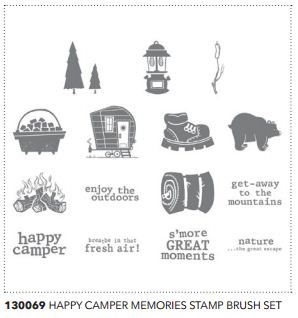
The Happy Campers Memories Brush Stamps will be great for those camp outs and other adventures. The Fifty Nifty Kit will be great for vacations, homeschooling and school projects as well as your regular scrapbooking and card making. The Sunflower Stamp Brush is great too. I have the Doily one and it's fun to use to make backgrounds. And last... but not least... It's A Wrap Occasions Stamp Brush Set is going to be fun. I've made some wraps for little chocolates before... and if you are making multiples for baby showers, wedding treats, teacher gifts or for whatever event... being able to print them out using Stampin' Up!'s great designs makes the chore MUCH easier.
And here they are....Enjoy!


Don't forget... if you don't have MDS you can download My Digital Studio Express for FREE! You can try it out for 30 days to see if you like it. It's an awesome program so I warn you... you are probably going to love it just like me. Another great thing about MDS downloads... you can purchase the downloads without the MDS software. You can use it in software that you already have such as Photoshop. Cool huh!
Click HERE to see more MDS downloads.

$99 to get started? Really???

Pin It


Wow! Stampin' Up! keeps making things easier and easier. Can you believe you can get started with Stampin' Up! for only $99? It's true! Not only has the price been lowered to make it more affordable... they've also made the kit fully customize-able. That means... YOU get to pick the products that come in it.


This is especially great for those of you who already have Stampin' Up! products, you can get the products you want. You get a total of $125 worth of product and $65 worth of  business supplies. You can choose the basic business supplies or the digital supplies if you plan on going digital. You are getting $195 worth of supplies for only $99... that's great!

So maybe you are just getting started with Stampin' Up!. Don't know what to get? You can always contact me and I'd love to help you customize your kit. Also... Stampin' Up! has that covered as well. They have a section of "suggested items". This will help you build your kit with popular items. 

So what kind of demonstrator do you want to be??? 
You can choose!

Discount Demonstrator:
You like the idea of buying stamps and supplies for your personal use at a 20 percent discount and occasionally selling to neighbors, relatives, friends, etc. 

Seasonal Demonstrator:
You work hard for a short period of time or season to earn a specific amount of money or to achieve a specific goal, and then you maintain minimum orders and sales during the balance of the year.

Hobby Demonstrator:
You love doing workshops and earning extra money when it is convenient. You work a lot some months and very little other months. You will do workshops if they are easy to book, and maybe have a regular group that meets together once a month. You enjoy the rewards that being a Stampin’ Up! demonstrator brings, but you don’t plan to make Stampin’ Up! a career.

Career Demonstrator:
You view Stampin’ Up! as a viable business with long-term career potential. You pursue a management role, and you want to continue moving up with your Stampin’ Up! career. You love attending Stampin’ Up! events and have close relationships with other demonstrators. You work at your business in a consistent and outgoing manner. 


As you can see, this is a fun, flexible business you can build to suit your individual needs and goals.


Click the link above and then click on the JOIN NOW button to the left to get started today!